


API guide
Generate and test a TypeScript SDK from OpenAPI with Scalar

In this walkthrough, we imported a synthetic OpenAPI document into Scalar, built one private TypeScript SDK, downloaded its source, and used it to make one request to a local mock.
Contents
Sponsored by Scalar.
An SDK tutorial should show what crosses the network, not stop at generated files. In this walkthrough, we imported a synthetic OpenAPI document into Scalar, built one private TypeScript SDK, downloaded its source, and used it to make one request to a local mock.
The request returned HTTP 200 with the expected parcel data. Here is the source-based workflow we tested, including where the generated interface differed from the specification and what this test did not verify.
The three companion source files
You need a Scalar account with access to SDK generation, Python 3, and Bun, which can execute TypeScript directly. Our local run used Bun 1.3.9. Keep port 8787 available on your machine.
The lab used these three companion source files:
synthetic-openapi.json: the synthetic OpenAPI document used as input to Scalar.mock_server.py: the local mock server providing the disposable API endpoint.parcel-example.ts: the exact client script used for the request, reproduced below.
The fixture contains no credentials or customer data. Its server address is http://127.0.0.1:8787, so the generated client will call a mock on your own machine. This workflow does not connect GitHub or publish to npm.
Inspect the operation before importing
The OpenAPI 3.1.0 document defines one GET operation. These small excerpts come from the full companion file; they are not standalone JSON documents:
    "/parcels/{parcelId}": {
      "get": {
        "operationId": "getParcel",
            "name": "parcelId",
            "in": "path",
            "required": true,
The required path parameter is a string. Supplying par_123 should produce GET /parcels/par_123. The successful response references the Parcel schema:
"$ref": "#/components/schemas/Parcel"
That schema requires id, status, and updated_at. Status has three allowed values: label_created, in_transit, and delivered. The timestamp is a string with the date-time format. Those details give us concrete things to inspect in the generated source and check in the response, rather than accepting a build indicator as the whole result.
Import and build one TypeScript target
Open SDKs in Scalar. If existing registry items are shown, choose “import new API.” Upload the companion OpenAPI document, select Private, and click Continue. On the language-selection screen, select only TypeScript, then choose Create SDK.
In our run, Scalar assigned the title “Parcel Test API SDK.” The dashboard reached Built. Open Config and Diagnostics before downloading; expanding Diagnostics showed “No issues found” for this document. These labels describe the observed run, not a guarantee about another specification. Scalar’s getting-started guide provides the broader dashboard workflow.
The observed configuration mapped parcels.models.parcel to #/components/schemas/Parcel and parcels.methods.retrieve to get /parcels/{parcelId}. Notice the method name: the input’s getParcel became parcels.retrieve. Check the generated interface instead of guessing a call from operationId. The configuration overview is the reference for further configuration work; this tutorial uses the observed mapping without additional customization.
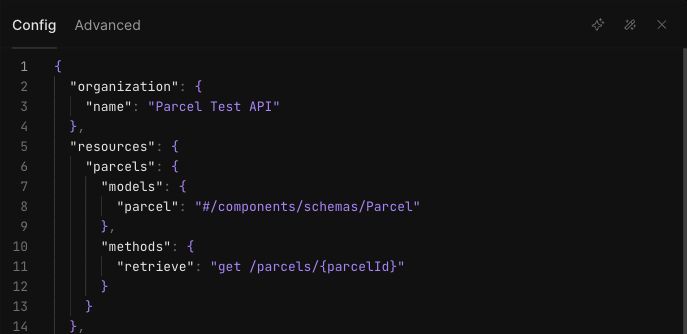
SCALAR-S2: Scalar’s configuration for the synthetic Parcel Test API maps the parcels model to #/components/schemas/Parcel and the retrieve method to get /parcels/{parcelId}.
Download source, not a published package
Choose Download build and extract the SDK into a folder. The downloaded manifest records generator version 0.33.2. In src/resources/parcels.ts, the emitted method is retrieve(parcelID: string, options?: RequestOptions), returning APIPromise<Parcel>.
The Parcel interface retains updated_at: string; it does not rename the property to updatedAt or declare it as a JavaScript Date. The status field is a union of the three string values from the schema.
The artifact’s package.json has no runtime dependencies. It does have TypeScript ^6.0.0 as a development dependency, plus build and typecheck scripts. We did not install dependencies or run those scripts locally. Instead, Bun executed the downloaded TypeScript source directly.
The generated README includes an npm installation example for the package name. That is guidance for a future package-distribution workflow, not evidence that this private package is published or available. Do not use that installation line for this exercise.
Run the mock and the exact client example
Place the companion parcel-example.ts at the downloaded SDK’s root, beside src and package.json. Leave the generated source unchanged. The relative import in the example depends on that placement.
In a separate terminal, start the companion mock:
python3 /path/to/mock_server.py
Replace the illustrative path with the local location of mock_server.py. Wait for listening http://127.0.0.1:8787; no browser visit or preliminary HTTP request is needed.
The client example contains the exact code used in our run:
import ParcelTestAPI from './src/index.ts';

const client = new ParcelTestAPI({
  baseURL: 'http://127.0.0.1:8787',
  maxRetries: 0,
  timeout: 5000,
  logLevel: 'off',
});
const { data, response } = await client.parcels.retrieve('par_123').withResponse();
const expected = {
  id: 'par_123',
  status: 'in_transit',
  updated_at: '2026-09-20T12:00:00Z',
};
if (response.status !== 200 || JSON.stringify(data) !== JSON.stringify(expected)) {
  throw new Error('SDK response did not match the fixture');
}
console.log(JSON.stringify({ http_status: response.status, parcel: data }, null, 2));
The explicit base URL selects the loopback server. Retries are disabled for this single-request exercise. Calling .withResponse() gives the script both decoded data and the response status; the check compares them with the fixture before printing.
From the extracted SDK root, in your other terminal, run:
bun run parcel-example.ts
Our actual output was:
{
  "http_status": 200,
  "parcel": {
    "id": "par_123",
    "status": "in_transit",
    "updated_at": "2026-09-20T12:00:00Z"
  }
}
The mock recorded exactly one request:
request method=GET path=/parcels/par_123 status=200
After the command finishes, press Ctrl+C in the mock terminal. Our recorded run ended with shutdown requested and shutdown complete, confirming graceful cleanup.
What this result establishes
Three separate observations matter: Scalar reported Built, its expanded diagnostics reported no issues, and the downloaded source completed one successful request under Bun. None substitutes for the others. Scalar’s diagnostics documentation explains why a successful build should not be treated as proof of complete API coverage.
This test verified the generated parcel method’s request path, HTTP status, and decoded fixture fields. It did not exercise authentication, retries, error responses, or a production API. Local compiler/typecheck scripts, compiled package entry points, and package distribution also remain untested. If you intend to distribute the SDK, validate those separately rather than treating direct source execution as a package-release check.
To try the same specification-to-client workflow, start with Scalar SDK Generator. Keep the first operation small enough to compare its generated method and response with the specification yourself.